|

Color Management - An easy introduction to consistent true colors in capture - edit - print
By Klaus Bjarner
Calibrating your monitor
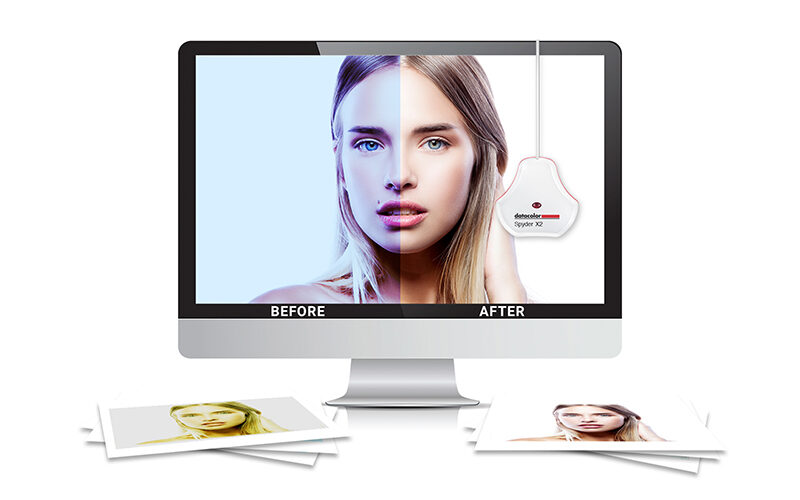
Working on an uncalibrated monitor makes it impossible to trust, what the monitor displays. There is no way of knowing, if the colors you see are true to the actual image file, or just a result of the divergence of your monitor. To illustrate the problem, the figure below shows a typical example of, how a file with correct colors is changed to a color cast in the editing process, due to an uncalibrated monitor.

Only a few years ago color management was a task only performed by highly specialized professionals. Today, thanks to companies like Datacolor and their Spyder2 and Spyder3 range of monitor calibration systems, profiling your computer monitor, printer, projector or even TV is as easy as 1 - 2 - 3. Investing in a system like this is the best and cheapest way to improve the quality of your work.
A calibration unit costs only a fraction of a good monitor or camera, but it will save you hours of agony and pain, while trying to get the colors right on an uncalibrated system. The calibration also gives you greater joy in your work by ensuring, that you achieve the highest quality possible.
Is color calibration then just for photographers you might ask? No, in fact it is for everybody. Of course photographers and other creative professionals are the ones who come to mind first, but everybody benefits from color calibrating their monitor. This is because the calibration not only ensures correct colors on your monitor, but also adjusts gamma, and thereby ensures a correct and consistent brightness variance from the darkest to the brightest colors. This gives a much better (and correct) contrast on the screen, which enhances the readability of text. This is the reason why more and more accountants and writers use color calibration on their equipment, even when working only with black and white text.
So how does it work in real life?
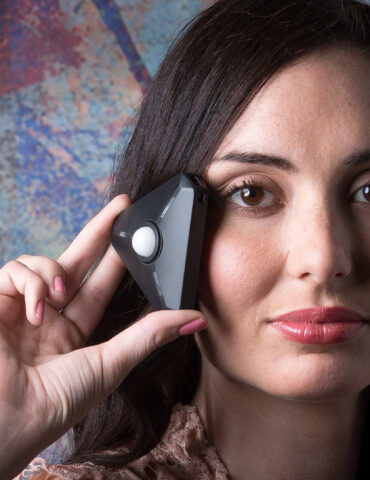
A monitor calibration system like the Spyder3 from Datacolor consists of measuring hardware and a software package that guides you through the calibration process. During the actual calibration process the hardware (an electronic eye) is placed in front of the LCD of your monitor. The software then displays a range of colors which are measured by the hardware. These readings are then compared to the actual data sent to the monitor. The difference between the two is the inaccuracy of the monitor. This information is then stored in an ICC profile, which is a standard for color management used by computer operating systems (like Microsoft Windows or Mac OS). When your computer reads the ICC profile, it knows if your monitor displays too much red in the green shades, and is then able to compensate for this fault before sending the signal to the monitor. This ensures that the monitor displays the correct color, and you see a 100% accurate reproduction of the colors stored in the image file on your hard drive.
The process is technically more nuanced, but the above explanation gives you a good simplified understanding of the process. And in basics there is not much more to it.
The Spyder3 calibrator unit does not just measure one color, because a monitors color cast is not necessary consistent throughout the entire color spectrum. It might display to much red in the green colors, and too little when displaying blue, so to ensure a perfect calibration, Spyder3 measures ten shades of each of the primary colors - red, green and blue. In addition it also measures shades of gray including black and white level plus a few more variables that affects your monitor. But all of this is carried out automatically by the software.
Now that you have heard about all the splendors of color management and the benefits from calibrating your monitor, how do you get started? Well the first step is to acquire a color calibration unit.
From my own experience as a pro photographer and long time user of color calibration it doesn't come better or easier to use than the new Spyder3 line from Datacolor. Datacolor was formerly known as Colorvision and has been a consistent provider of professional equipment for color calibration over many years. The company is also working with vendors like BMW, Porsche and Ferrari to ensure accurate colors in the painting process.
Calibrators from Datacolor come in three flavors. Which one is right for you depends upon the level of sophistication of your setup. All three calibrators deliver correct calibration, but where the entry level Spyder2Express version have fixed settings and some limitations in the calibration process the highest level Spyder3Elite gives you the opportunity to use and adjust the full features of the software, calibrate multiple monitors to one target and calibrate your projectors. The Spyder3Pro and Elite version also allows you to calibrate the latest wide gamut monitors (Gamut is an expression of the range of color, the monitor can display).
If this is your first time reading about monitor calibration, and you would like to ensure correct colors and best possible image quality, the Spyder2 Express is a great place to start. Since all settings in the software are fixed for optimum calibration, all you have to do is install the software, which supports both Mac and Windows, and attach the Spyder2 Express to your computer. The software will prompt you a few questions about your monitor and the rest of the calibration process is fully automated. After five minutes your monitor is calibrated, and you are ready to enjoy correct colors. The software even shows you a before and after view, so you can see the effect of the calibration. All first timers finds the calibrated monitor to yellow or warm, but that is because they have been used to looking at wrong settings for too long. Almost every uncalibrated monitor I have seen has been set too cool from the factory or by the user.
For the more demanding user with a pro monitor from companies like EIZO, NEC or LaCie, or a user working with multi screen setup the Spyder3Pro or Elite is the right choice. With the Spyder3 series you get a new and improved industry leading 7-cell sensor that handles 100% precise calibration, even of the latest wide gamut LCD monitors. A well established professional monitor brand like EIZO is exclusively using the Spyder3 calibrator in bundles with their professional line of graphical monitors, ColorEdge.
The Spyder3Elite is top of the range from Datacolor. It does all what the Pro version does and in addition handles projector calibration and has the ability to deliver an extensive report on the calibration process. The price difference from the Spyder3Pro to the Spyder3Elite is quite small, so my advice for all amateur and pro photographers is to take the Spyder3Elite. This way you get the best calibration possible without any limitations, and with the possibility to calibrate a projector as well. A thing that might come in handy at seminars, shows or similar.
Now, how often should I calibrate my monitor to make sure it stays accurate? Due to the way a monitor is constructed the colors change over time. This is partly because the back light degrades, so the maximum brightness of the monitor slightly decreases. To ensure 100% accurate colors it is necessary to calibrate a monitor regularly every 2-4 weeks. As a pro photographer I calibrate my own monitor every two weeks.
With the need to calibrate every 2-4 weeks it is nice to know, that Datacolor has build in a reminder in the software that automatically reminds you to re-calibrate after a period of time specified by you. A calibration with the Spyder3 calibrators takes only 2.5 minute, so it doesn't obstruct your work or takes unnecessary time. With the Spyder2Express the calibration process is done in less than five minutes.
Continue reading: Calibrating your printer »
|